Dated price historyShipping quoted at AliExpress checkout
AliExpress rolls today’s dealsUSD converted from AliExpress’s CNY prices
Free extension for Chrome and Firefox
Before you trust the discount, check the record.
The PriceProven extension shows the prices we recorded for the listing you are looking at: the lowest and highest we saw, how many days we watched, and whether the seller’s crossed-out price ever appears in our record. If we don’t have enough history, we say so.
No account. You choose before listing details are sent.
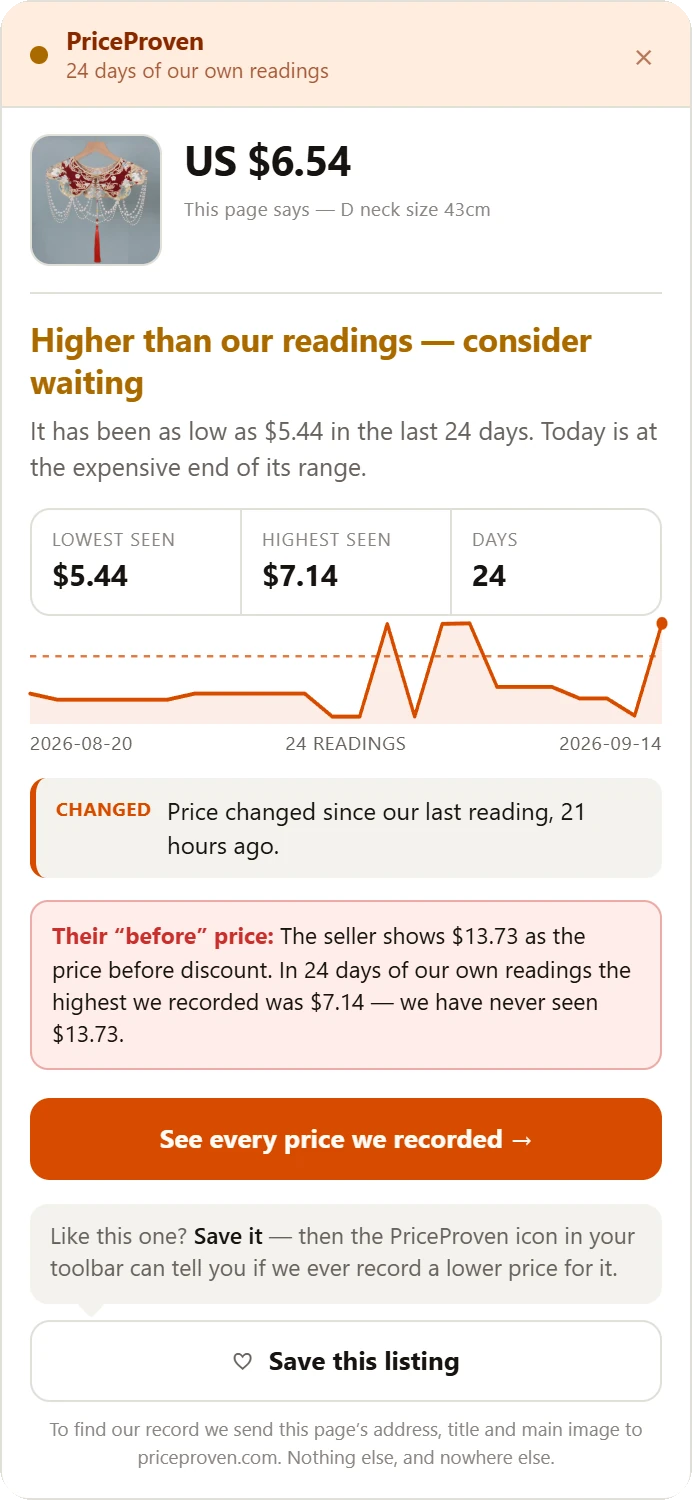
One listing, two stories
What the listing shows
$13.73
shown as the price before discount
Asking US $6.54 that day.
What we recorded
Beaded Red Cloud Collar — one listing, read on 15 September 2026. Other listings, other numbers.
What it shows
Every price in the panel is one we read ourselves, on a day we can name. Not an estimate, not a model.
The lowest and highest price we recorded for this listing, and over how many days.
If the seller’s “before” price never appears in our record, the panel says so, in those words.
The “See every price we recorded” button opens every reading we hold for the listing, on priceproven.com.
Save it for later
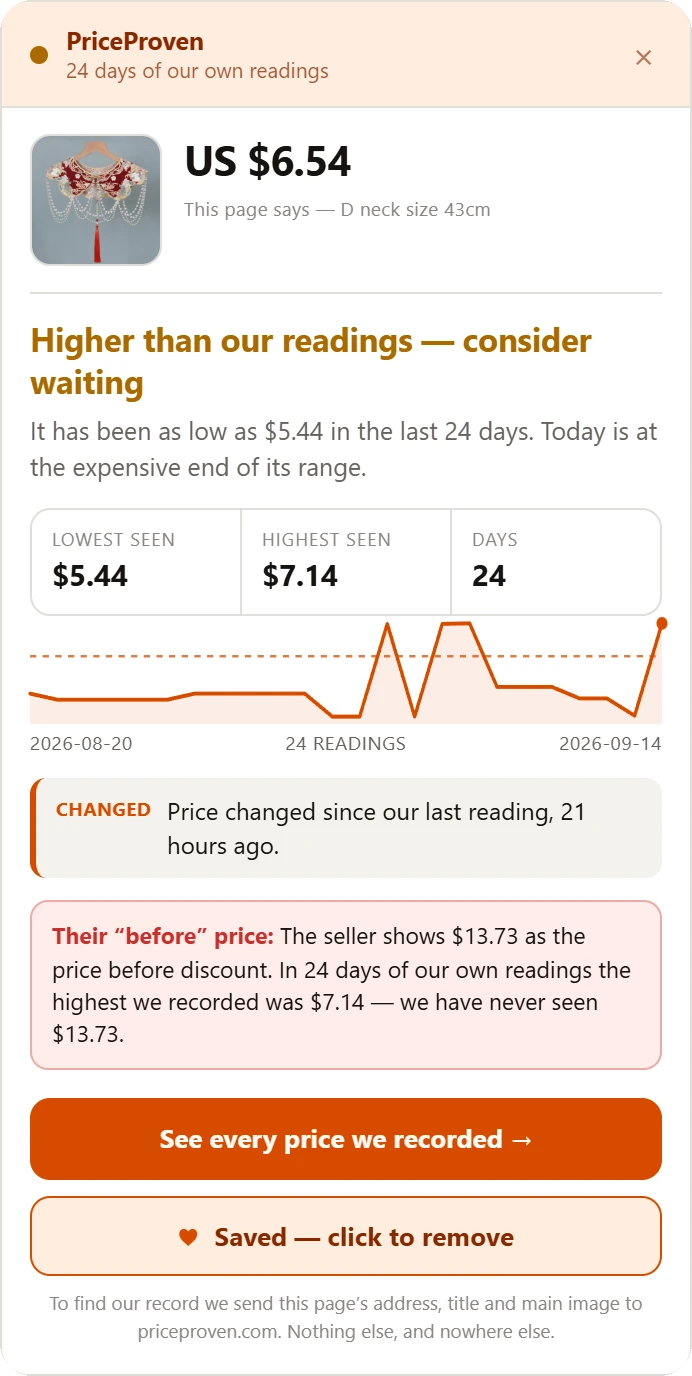
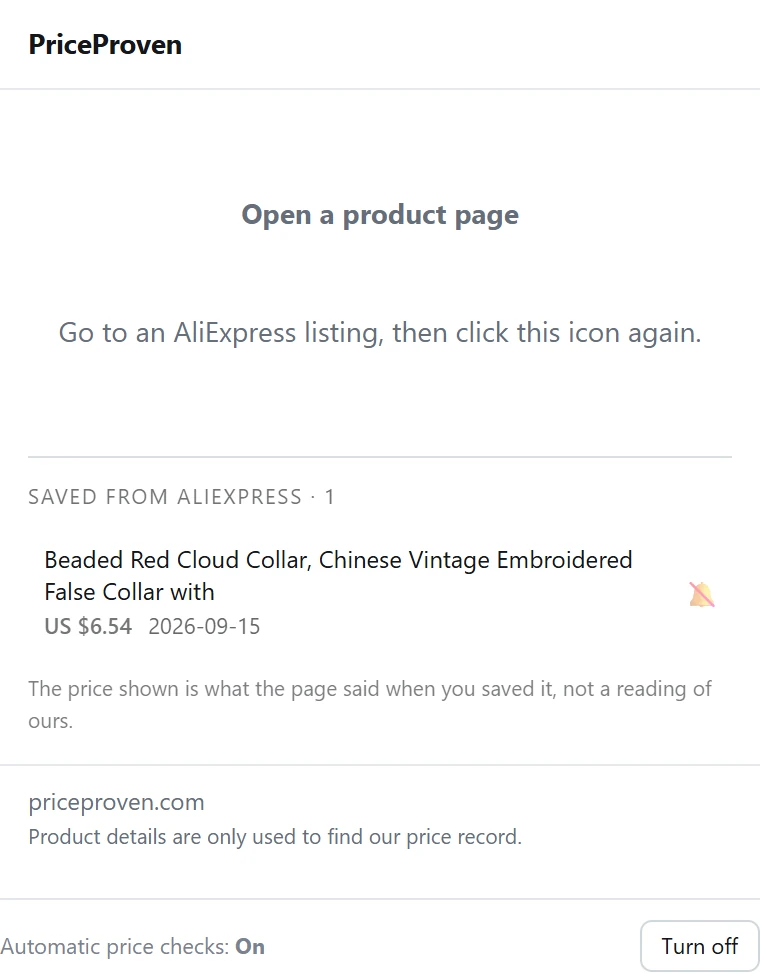
Save this listing, right under the orange button, keeps it in your own browser with the price that day. Saving sends nothing to us, and there is no account to make.
What you saved waits under the PriceProven icon in your toolbar. Beside a listing we already record, the bell switches on a watch: about every six hours the extension asks for our latest reading, and if it is at least 5% below what we had recorded when you saved it, your browser tells you. It asks for that permission when you tap the bell, not before.
Rather have an email? In the toolbar window, Email me once sends us your address and that listing, and we write once, when we have recorded enough days to say more about its price. That is the only time the extension sends your address, and only after you type it.
Away from AliExpress
Right-click a product photo on any shop and choose Search AliExpress by this image. The extension hands that photo to AliExpress’s own image search and opens what it finds.
You right-click the photo
Chrome’s menu gets one PriceProven item, on images only. Nothing has been read and nothing has been sent.
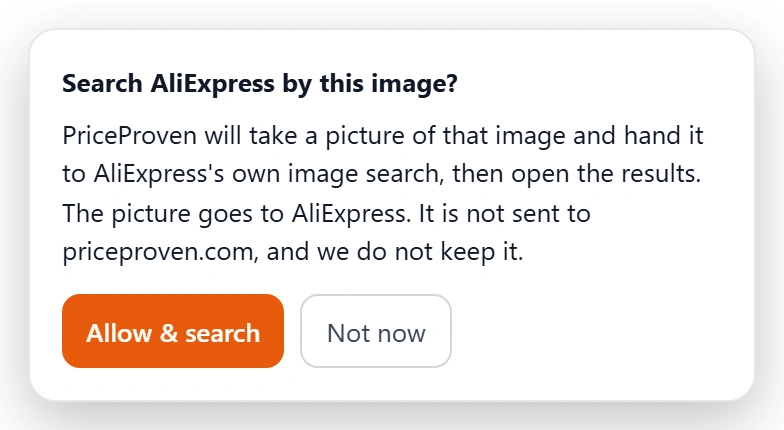
We ask, once
The card pictured here appears in the shop’s own page, before anything is captured. “Not now” ends it there.
AliExpress answers
Its own image search opens in a new tab with what it found. The panel you already know is not involved.
What it finds, and what it does not
It finds items that look like the photo. That is not the same thing as the same product.
Measured on 17 September 2026, using the photo of a 4K digital microscope we already record at US $104.47: everything that came back was a digital microscope, from US $105.27 to US $227.99 — and that listing itself was not among them. So the extension shows you AliExpress’s results and says nothing about whether anything there is cheaper, or is the item you were looking at.
Where the photo goes
To AliExpress
It is their image search doing the looking.
Never to priceproven.com
We are not in the middle of it.
We do not keep it
We never receive it, so there is nothing to keep.
The discount is a claim.
The price history is a record.
When it stays quiet
Most AliExpress listings are new to us. On those, the panel says how long we have been recording and how many more days a verdict needs — and stops there. No chart drawn from one price. No average of one reading.
We would rather show you an empty answer than a confident one we can’t support.
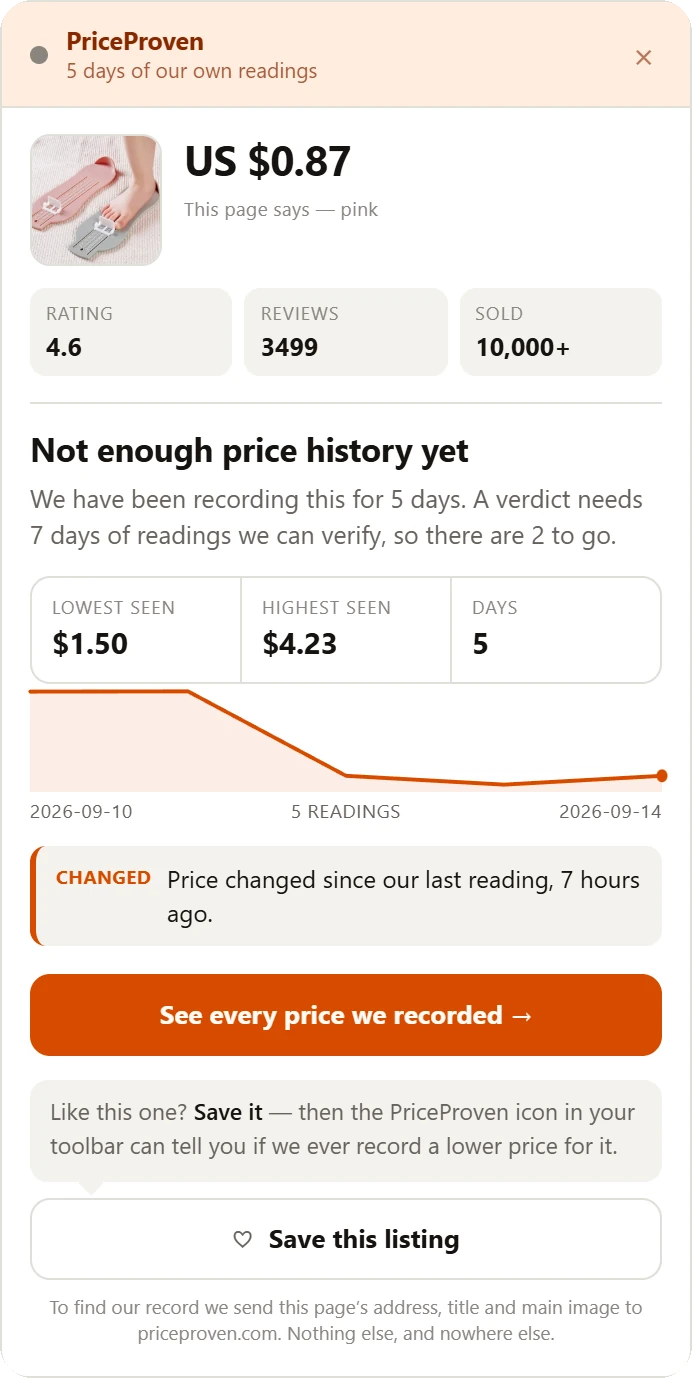
What you might see
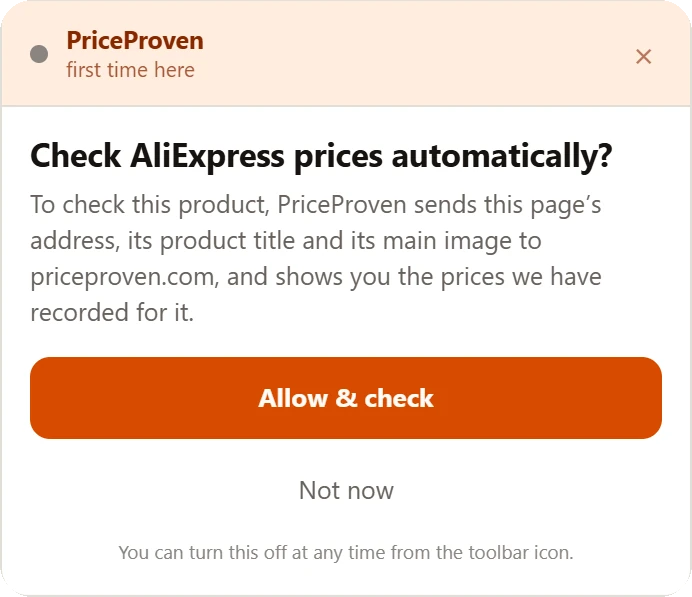
It asks first
“Check AliExpress prices automatically?”
A “before” price we never saw
“we have never seen $13.73”
Too new to judge
“Not enough price history yet”
Three things, to find our record for the listing.
PriceProven · one lookup
Only after you allow it.
The same three fields are named in the panel before it sends anything, and in our privacy policy. A watch you switch on sends the same three, for that saved listing, about every six hours. Your email reaches us only through “Email me once”, with the one listing you were on.
Five permissions, a sixth only if you ask for alerts, and the same two kinds of page as before.
storage
Remembers your answer to the first question, so it is asked once, and keeps the listings you save — in your browser, not on our server.
alarms
Wakes the extension about every six hours, so a watch you switched on can ask for that listing’s latest reading. With no watch on, it sends nothing.
notifications · only if you ask
Chrome asks for it when you switch on a watch, and not before, so we can tell you we recorded a lower price. Say no and saving still works.
right-click menu
Adds one item, on images only: Search AliExpress by this image · affiliate link. The browser shows no warning for it, and it does nothing until you choose it.
the tab you are on · only when you ask
Granted by your click — a right-click on a photo, or “Search by photo” in the toolbar window — for that one tab and that one action. The photo is read out of a picture of the visible tab rather than fetched from the shop’s server, which is what keeps this from needing access to every site you visit.
scripting
Runs two short jobs for the photo search: finding where the photo you chose sits on the page, and handing it to the AliExpress tab the extension opens for the search. It runs nothing on its own.
AliExpress product pages
Reads the listing you are viewing, so we can find our record for it and draw the panel beside it. Away from AliExpress the extension reads nothing on its own — only the photo you right-click, after you allow it.
priceproven.com
Where the record lives. The panel asks it for this listing’s readings. On priceproven.com itself it also reads the list you saved on the website, so the toolbar icon can show it — that copy stays in your browser.
Yes. There is no account and no paid version.
Some of the links it opens are AliExpress affiliate links, and each is labelled “affiliate link” where you click it — for example the photo search, an item you reopen from your saved list, or a price-drop alert. If you buy after one of them, AliExpress may pay us a commission; the price you pay does not change. It does not rewrite the links on AliExpress pages, add coupons or touch checkout — how that works.
It does not read them. On any site you can right-click a product photo and choose “Search AliExpress by this image”, and the extension hands that photo to AliExpress’s own image search. It looks for things that look like the photo — not for the same product, and it makes no claim about price.
No. It is a browser extension, so it works in Chrome and Firefox on a computer — not on a phone and not in the AliExpress app.
Yes — the same extension, version 1.3.10, is on Firefox Add-ons: PriceProven for Firefox.
Only if you type it. In the toolbar window, “Email me once” sends your address and the listing you are on, so we can email you once when we have recorded enough days to say more about its price. It is not a price-drop alert, nothing is kept in the extension, and no other part of the extension asks for an address. How we handle it is in our privacy policy.
Yes, for listings you save. Tap the bell beside a saved listing and about every six hours the extension asks for our latest reading; if it is at least 5% below what we had recorded when you saved it, your browser tells you. It asks for that permission when you tap the bell, not before.
Not from the extension: its price-drop alerts are notifications in your browser. The one email it can send is “Email me once”, described above.
Because we have not recorded that listing for long enough. A verdict needs seven days of readings we can verify; until then the panel tells you how many are left, and gives none.
From our own readings of AliExpress, each one dated. How we take them is on the price record.
Before you trust the discount, check the record.
No account. You choose before listing details are sent.
PriceProven is independent and not affiliated with AliExpress. Check a price on the website instead
